
how to check hours on liftron forklift
Understanding Your Liftron Forklift Hour Meter: A Complete Guide
Checking the hours on your Liftron forklift is essential for scheduling maintenance, tracking usage costs, and ensuring operator safety. The hour meter, also known as an engine hour meter or service hour meter, records the total time the forklift has been in operation. Whether you own an electric model or an internal combustion unit from Liftron Material Handling, knowing how to read this gauge helps you stay ahead of wear and tear. This guide walks you through the simple process of locating and interpreting the hour meter across different Liftron models.
Why Tracking Forklift Hours Matters
Forklift hours are the industry standard for measuring machine life and service intervals. Unlike vehicle odometers, forklift hour meters record elapsed engine or motor run time, not distance. This number directly informs when oil changes, filter replacements, brake inspections, and battery water checks should occur. Ignoring these hours can lead to premature component failure, increased downtime, and potential safety hazards. For fleet managers, accurate hour reading also enables fair asset allocation and accurate resale value assessments.
Locating the Hour Meter on Liftron Forklifts
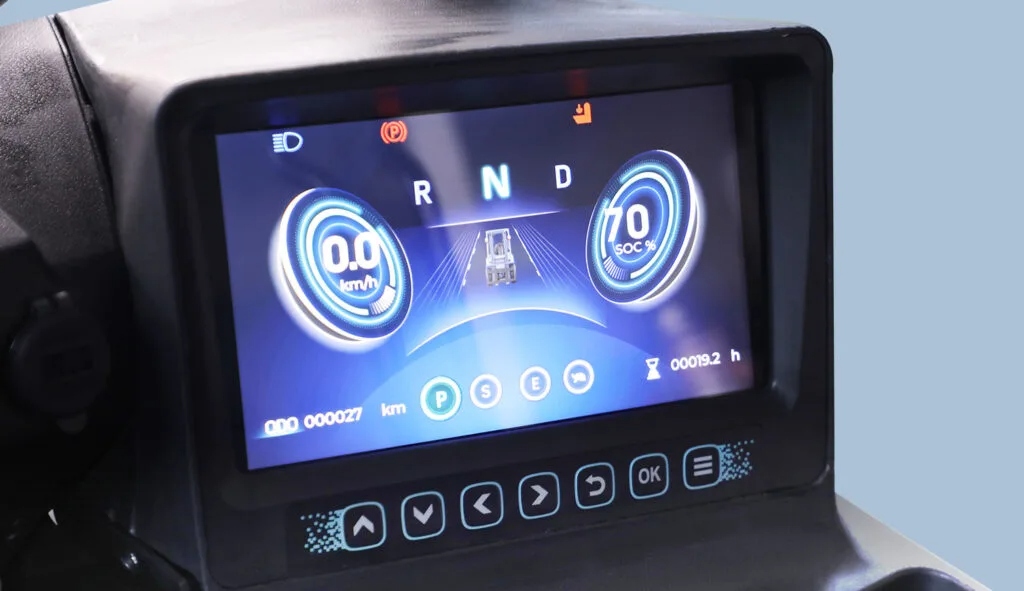
The hour meter placement varies slightly depending on the model and configuration. Most Liftron counterbalance trucks place the display in the instrument cluster directly in front of the operator, typically behind the steering wheel or near the tilt cylinder lever. For the newer Liftron DL SERIES lithium-ion models, the hour readout appears on a digital LCD screen integrated into the dashboard, often combined with battery voltage and fault codes. On older or compact models, you may find a small analog dial with six digits (hours and tenths of hours) mounted near the key switch or under the seat cowling.
Step-by-Step: Reading a Digital Hour Meter
Digital meters are straightforward to read. Follow these steps to get an accurate reading on your Liftron DL SERIES or any digital display:
- Turn the key switch to the “ON” position without starting the motor or engaging the drive system.
- Look for a display segment labeled “HOUR” or a small clock icon on the LCD screen.
- The number shown typically reads in whole hours (e.g., 1,234) with a tenths digit after a decimal point (e.g., 1,234.5).
- If the display is blank, press the “display mode” button on the dashboard to cycle through the menus until the hour value appears.
- Record the number for your maintenance log or service ticket.
Step-by-Step: Reading an Analog Hour Meter
Analog counters are mechanical and need no power to retain the reading. To read one correctly:
- Look for a small rectangular or circular window near the steering column or on the instrument panel.
- Read the numbers from left to right. The last digit (often colored white or red) represents tenths of an hour (6 minutes increments).
- For example, if the counter reads 004321, that means 4,321 hours and 0 tenths. If it reads 0043216, that means 4,321 hours and 6 tenths (about 36 minutes).
- No power is required to view the value, unlike digital meters that may need the key on.
Special Considerations for Electric and Lithium-Ion Models
Electric forklifts, including the Liftron DL SERIES with lithium-ion batteries, do not have engine hours. Instead, they record motor controller operating hours or service hours that accumulate when the travel pedal is pressed or when hydraulic functions are active. This means an hour meter may show lower hours than total key-on time if the truck sits idle. Always consult your operator manual to understand exactly what the meter records. For the DL SERIES system, the hour meter also tracks regenerative braking and charge cycles, giving a more precise indication of component stress.
What to Do If Your Hour Meter Is Not Working
If your Liftron forklift hour meter fails to display or shows an erratic reading, inspect these common issues:
- Blown fuse in the instrument cluster circuit – check the fuse box under the dash or near the battery compartment.
- Loose wiring connector behind the display – gently push the plug to ensure a snug fit.
- Faulty key switch – the meter only receives power in the “ON” or “RUN” position.
- On electric models, a fully discharged battery may shut down all displays. Charge the battery completely and retry.
- For mechanical counters, the internal gear train may have jammed due to debris – do not attempt disassembly; contact a certified technician from Liftron Material Handling for a replacement.
How to Reset or Adjust the Hour Meter
Resetting an hour meter is generally illegal and highly discouraged because it misrepresents the true usage and can void warranties. Instead, if you need to correct a service interval reminder (not the total hour count), most Liftron digital displays allow resetting a separate maintenance counter via a long press on the “mode” button. Refer to the specific model manual for the reset procedure for the service interval only. Attempting to zero out the total hours will likely damage the sealed unit and may expose you to liability in resale scenarios.
Maintenance Schedule Based on Hours
Use these general guidelines to keep your Liftron forklift performing reliably, but always cross-reference with your specific owner’s manual:
| Hour Interval | Recommended Service |
|---|---|
| Every 50 hours | Check hydraulic oil level, inspect tire pressure, lubricate pivot points |
| Every 250 hours | Replace motor oil and filter (ICE models), inspect brake fluid, clean battery terminals |
| Every 500 hours | Replace hydraulic filter, inspect mast chains, check wheel lug nuts |
| Every 1000 hours | Full transmission/hydraulic oil change, replace air filter, perform load test on battery |
Digital Monitoring and Telematics on DL SERIES
If you operate a Liftron DL SERIES, you have an advantage: built-in telematics capability. This system logs hour data automatically and can be accessed via a smart display or a fleet management portal. To view historical hour usage, navigate to the “Information” menu on the touchscreen, then select “Service Log” or “Usage Report.” Remote monitoring allows your maintenance team to receive alerts when a pre-set hour threshold is reached, eliminating the need for manual checks. This feature also improves battery longevity by tracking deep discharge cycles.
Common Mistakes to Avoid
Even experienced operators sometimes misread hour meters. Here are pitfalls to avoid:
- Assuming the meter counts only while the machine moves – many models count whenever power is on.
- Ignoring tenths of an hour – for precise oil change scheduling, the tenths matter.
- Using engine RPM to estimate hours – always rely on the meter, not gut feeling.
- Failing to record hours during shift changes – a quick photo can save hours of back-labor.
Understanding how to check hours on your Liftron forklift is a straightforward skill that yields significant long-term savings. Add a routine hour check to your pre-shift inspection, maintain a logbook, and follow the manufacturer’s service intervals outlined here. By doing so, you protect your investment, reduce downtime, and ensure a safe working environment for every operator. If you ever need clarification on your specific model’s meter behavior, reach out to an authorized dealer for professional guidance.



Add a review
Your email address will not be published. Required fields are marked *