
How to Get Codes Out of a Liftron Forklift
Learning how to retrieve diagnostic codes from a Liftron forklift helps operators identify faults quickly, reduce downtime, and maintain safe equipment performance.
Introduction
Modern forklifts rely on electronic control systems to monitor engine performance, battery status, hydraulic functions, drive motors, and safety components. When a malfunction occurs, the onboard controller typically stores a diagnostic trouble code (DTC) that can help technicians identify the source of the problem. Understanding how to get codes out of a Liftron forklift can save valuable troubleshooting time and prevent unnecessary repairs.
Whether you operate an electric warehouse truck, an internal combustion forklift, or a lithium-powered model, diagnostic codes provide important information about the machine’s condition. Many operators use equipment from Liftron Material Handling because of its reliability and advanced technology, making proper diagnostics an essential part of maintenance.
Why Diagnostic Codes Matter
Forklift diagnostic systems continuously monitor various sensors and controllers throughout the machine. When an abnormal condition is detected, the controller generates an error code and often displays it on the dashboard.
These codes can help identify:
- Battery and charging system issues
- Motor controller faults
- Hydraulic system problems
- Sensor failures
- Communication errors between controllers
- Throttle and pedal malfunctions
- Safety system warnings
- Temperature-related faults
Instead of replacing parts through trial and error, technicians can use stored codes to pinpoint the likely source of a problem.
Preparing the Forklift Safely
Before attempting to access diagnostic information, always follow basic safety procedures.
- Park the forklift on a level surface.
- Lower the forks completely.
- Engage the parking brake.
- Turn off any active attachments.
- Ensure the surrounding area is clear.
- Wear appropriate safety equipment.
Never attempt diagnostic procedures while the forklift is moving or lifting a load.
Checking the Dashboard for Error Codes
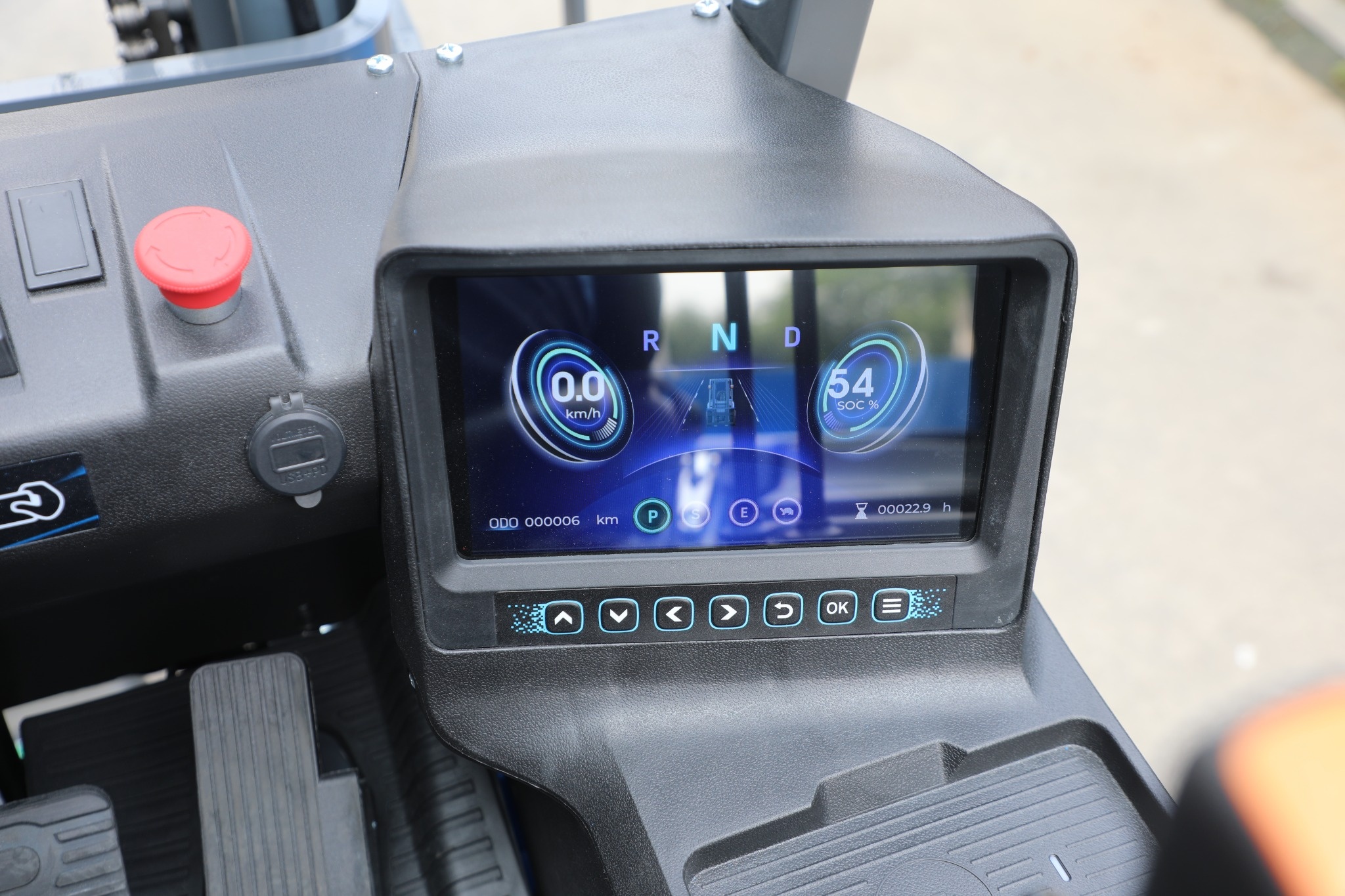
The simplest method for retrieving codes is through the forklift’s display panel.
Many Liftron forklifts feature a digital dashboard or LCD display that automatically shows active fault codes whenever a malfunction occurs. After turning the key switch to the ON position, observe the display for warning symbols, flashing indicators, or alphanumeric codes.
Common formats may include:
- E101
- E205
- F12
- P001
- Controller-specific numerical codes
Record any displayed codes before turning the machine off, as some faults may disappear after a restart.
Using Diagnostic Mode
If codes are hidden or require manual retrieval, many forklifts provide a built-in diagnostic mode.
To get error codes out of a Liftron (or similar industrial) forklift, safely secure the machine and check the digital dashboard or hour meter. If codes are hidden or require a reset, perform a standard key-and-pedal sequence to force the system into diagnostic mode.
The exact sequence varies by model, but a common procedure may include:
- Turn the ignition key to OFF.
- Press and hold the accelerator pedal.
- Turn the key to ON.
- Continue holding the pedal for several seconds.
- Release the pedal when diagnostic mode appears.
- Use dashboard buttons to scroll through stored codes.
Always consult the specific service manual for your forklift model because procedures may differ between electric and internal combustion units.
Reading Historical and Active Fault Codes
Most forklift controllers store two categories of fault information:
Active Codes
Active codes represent current problems that are affecting machine operation. These faults typically remain visible until the issue is corrected.
Historical Codes
Historical codes record faults that occurred previously but may not currently be active. They are useful for diagnosing intermittent issues.
When reviewing diagnostic information, document both active and historical codes to provide technicians with a complete picture of system performance.
Using Service Software
Some advanced forklifts support laptop-based diagnostics through a communication port. Service technicians connect specialized software that provides access to:
- Stored fault codes
- Controller parameters
- Battery information
- Motor performance data
- Hydraulic settings
- Real-time sensor readings
- Error history logs
This method often delivers more detailed information than the dashboard alone and can be especially useful for complex electrical troubleshooting.
Diagnostic Codes on Lithium-Ion Forklifts
Lithium-powered forklifts often include additional battery management systems (BMS) that monitor charging and battery health. Models such as the Liftron DL SERIES may generate battery-related diagnostic information when abnormal operating conditions are detected.
Examples include:
- Battery over-temperature warnings
- Cell voltage imbalance alerts
- Communication errors
- Charging faults
- Protection mode activation
These codes help operators identify battery issues before they lead to performance problems or unexpected downtime.
Can Error Codes Be Cleared?
In many cases, error codes automatically clear once the underlying problem has been corrected. Some systems may require a manual reset procedure or the use of service software.
Before clearing codes, technicians should:
- Record all fault information.
- Repair the root cause.
- Test the forklift thoroughly.
- Verify that the fault does not return.
Simply clearing codes without fixing the issue can result in recurring failures and potential safety risks.
Common Reasons Codes Appear
Forklift diagnostic systems may generate codes due to a variety of operating conditions, including:
- Low battery voltage
- Loose electrical connections
- Overheated motors
- Sensor failures
- Hydraulic pressure abnormalities
- Faulty switches
- Controller communication errors
- Operator misuse
Regular inspections can help reduce the frequency of these faults and improve overall equipment reliability.
Maintenance Tips to Prevent Future Codes
Preventive maintenance remains the best strategy for minimizing diagnostic alerts.
- Inspect battery connections regularly.
- Keep controllers and wiring clean.
- Check hydraulic fluid levels.
- Monitor tire condition.
- Follow scheduled service intervals.
- Update controller software when recommended.
- Train operators on proper forklift use.
Consistent maintenance helps prevent minor issues from developing into costly repairs.
Conclusion
Knowing how to get codes out of a Liftron forklift is an important skill for operators, maintenance personnel, and fleet managers. By accessing diagnostic mode, reviewing dashboard information, and utilizing service software when necessary, users can quickly identify faults and improve equipment uptime. Whether operating traditional forklifts or advanced lithium-powered models from Liftron Material Handling, understanding diagnostic codes helps maintain safety, reliability, and productivity while reducing long-term maintenance costs.
Add a review
Your email address will not be published. Required fields are marked *