
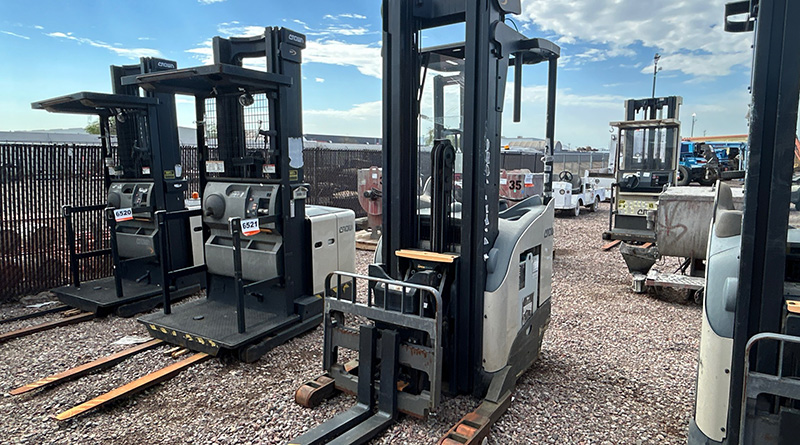
How to Operate a Crown Reach Truck: Complete Guide for Safe Warehouse Handling
Operating a Crown reach truck requires training, authorization, safe positioning, smooth control use, and constant awareness.
Crown reach trucks are designed for warehouse environments where operators need to move pallets through narrow aisles, lift loads to elevated rack positions, and handle inventory with precision. Unlike a standard sit-down forklift, a reach truck is built for tighter spaces and vertical storage systems. Because of this, operating one safely requires proper training, authorization, and a clear understanding of the truck’s controls.
A Crown reach truck typically uses a multi-task handle or joystick-style control system that allows the operator to manage travel, lifting, lowering, reaching, retracting, tilting, and sideshifting. The operator stands inside the operator compartment, places both feet in the correct position, uses the pedals and control handle properly, and keeps speed controlled at all times. Since reach trucks often work close to racks, pedestrians, and other equipment, smooth operation is more important than speed.
This guide explains how to operate a Crown reach truck in a general warehouse setting, including getting started, driving, using the forks and reach mechanism, following safety best practices, and understanding common reach truck problems. Always follow your employer’s training program, the Crown operator manual for your specific model, and workplace safety rules before operating any powered industrial truck.
1. Getting Started
| Step | What to Do |
|---|---|
| Safety Check | Inspect the truck before use, including forks, mast, reach mechanism, wheels, battery, controls, horn, brakes, lights, and hydraulic functions. |
| Proper Position | Enter the operator area correctly, stand in the designed position, and keep both feet on the required pedals or floor areas. |
| Power Up | Turn the truck on according to the manufacturer’s instructions and confirm that the display shows normal operating status. |
| Controls | Review the multi-task handle, steering control, horn, brake, lift, lower, reach, retract, tilt, and sideshift functions before moving. |
Safety Check Before Operation
Before operating a Crown reach truck, complete a pre-use inspection. This step should never be skipped. Look for visible damage, fluid leaks, worn tires, loose parts, cracked forks, damaged load backrest components, mast problems, or unusual battery conditions. Test the horn, steering, brakes, emergency stop, travel controls, lift and lower functions, and hydraulic movements.
If the truck shows warning lights, error messages, weak braking, jerky movement, hydraulic leaks, or unusual noises, do not use it. Remove it from service and report the issue to a supervisor or maintenance technician. A reach truck often works at height and in narrow aisles, so even a small problem can become serious during operation.
Proper Operator Position
After inspection, enter the operator compartment using the correct handholds and steps. Stand in the designed operating position and keep your body fully inside the operator area. Many Crown reach trucks require the operator to place their feet on specific pedals or presence sensors before the truck will move.
Good body position improves control. Keep one hand ready for steering and the other on the multi-task handle when operating. Keep your head, arms, legs, and hands inside the operator compartment. Never lean outside the truck while traveling or handling loads.
Power Up and Understand the Controls
Once in position, power up the truck following the correct startup procedure. Check the display for battery charge, warning messages, performance mode, and operating status. Do not begin work if the display shows an active fault or if the truck does not respond normally.
The multi-task handle is the key control point on many Crown reach trucks. Depending on the model, the handle may control travel direction, speed, lift, lower, reach, retract, tilt, sideshift, and horn functions. Before moving into an aisle, operators should know exactly which control performs each function. Confusing lift, reach, or travel controls can damage racks, pallets, or products.
2. Driving the Crown Reach Truck
Travel Power Unit First
Traveling power unit first means the drive unit or operator compartment leads the direction of travel while the forks trail behind. This is often used when moving through open areas or traveling without a load. It can provide better visibility depending on the situation and truck design.
When traveling power unit first, keep speed controlled and watch for pedestrians, intersections, dock edges, floor damage, and other equipment. Use the horn at blind corners and slow down before turning. Reach trucks are designed for precision, not aggressive driving.
Travel Forks First
Traveling forks first means the forks lead the direction of travel. This may be necessary when positioning into a rack, approaching a pallet, or moving in certain warehouse layouts. When traveling forks first, visibility can be more limited, especially with a load.
Operators should move slowly, look in the direction of travel, and use extra caution near racks and pedestrians. If the load blocks your view, follow your workplace procedure, which may require traveling in the direction with the best visibility or using a spotter in approved situations.
Speed Control
Speed control is one of the most important parts of operating a Crown reach truck. The truck may respond quickly to the control handle, especially when unloaded. Use gradual acceleration and avoid sudden changes in direction. Fast starts, sharp turns, and sudden stops can cause load instability and increase the risk of collisions.
In narrow aisles, reduce speed and focus on accuracy. A reach truck operates close to racks, pallets, and storage beams, so small steering mistakes can cause product damage. Smooth, predictable movement is safer and often more productive than rushing.
Steering
Reach truck steering may feel different from standard forklifts. The drive wheel can turn sharply, allowing the truck to maneuver in tight areas. This makes the truck highly useful in narrow aisles, but it also means operators must avoid oversteering.
Before operating near racks, practice steering in an open training area. Learn how the rear and front portions of the truck swing during turns. Always keep enough clearance from racks, walls, pallets, and people.
Stopping and Plugging
Stopping may involve releasing the travel control, using the brake pedal, or using plugging, depending on the model and training procedure. Plugging means changing travel direction through the control system to slow the truck. It should be used smoothly and only as trained.
Never rely on aggressive stopping as a normal habit. Sudden stops can shift loads, surprise pedestrians, and wear components. Always slow down before intersections, turns, aisle entries, and rack approaches.
3. Operating the Forks and Reach Mechanism
Lift and Lower
The lift and lower functions move the forks vertically. Before lifting a load, make sure the forks are fully inserted under the pallet and the load is centered. Lift only high enough to clear the floor during travel. Carrying a load too high can reduce stability and visibility.
When placing a load into a rack, raise the forks smoothly and stop at the correct height. Avoid raising or lowering too quickly. Precise control helps protect the product, rack structure, and truck.
Reach and Retract
The reach function moves the mast or fork carriage forward to place or retrieve loads from racking. The retract function brings the load back toward the truck for travel. This is the main feature that makes a reach truck effective in narrow aisles.
When retrieving a pallet, align the truck carefully, reach forward, insert the forks fully, lift slightly, retract the load, and then lower it to the proper travel position. When placing a pallet, raise to the correct level, reach forward carefully, set the load down squarely, withdraw the forks, retract, and lower before traveling.
Tilt
Tilt helps position the forks and stabilize the load. A slight backward tilt may help keep the load secure during travel, while forward tilt may be used carefully for placement. Too much tilt can cause instability, especially when the load is raised.
Use tilt gently and only as needed. Sudden tilt at height can shift the load or strike the rack. Always keep the load controlled and aligned before moving.
Sideshift
Sideshift allows the forks to move left or right without repositioning the entire truck. This is useful when aligning pallets with rack openings. However, sideshift should not be used carelessly. Large sideshift movements with heavy or raised loads can affect stability.
Use sideshift for fine positioning, not as a substitute for poor truck alignment. The better the truck is lined up before lifting, the safer and smoother the load handling process will be.
4. Safety Best Practices
Travel Position
When traveling with a load, keep the forks low and the load stable. The load should be high enough to clear the floor but not raised unnecessarily. Keep the mast retracted while traveling unless the task requires otherwise.
Travel slowly near intersections, rack ends, pedestrian walkways, dock areas, and blind spots. Use the horn where required and make eye contact with pedestrians when possible.
Pedestrian Safety
Pedestrians are one of the biggest safety concerns in any warehouse. Operators should slow down near people, stop when necessary, and never assume pedestrians see the truck. Use warning devices, follow marked travel lanes, and respect pedestrian-only areas.
Do not allow anyone to stand under raised forks or loads. Never lift people on the forks or a pallet. Reach trucks are designed for materials, not personnel lifting.
Tip-Over Protection
Reach trucks can tip if used incorrectly. Common causes include turning too fast, carrying loads too high, overloading the truck, driving on uneven surfaces, or moving with an unstable load. Always stay within the rated capacity shown on the data plate.
If a truck begins to tip, operators should follow their training and the manufacturer’s safety guidance. Keeping the body inside the operator area is critical. Avoid jumping from the truck unless instructed by approved safety training for the specific equipment type.
Parking
When parking a Crown reach truck, lower the forks completely, neutralize the controls, turn off the power, set the brake if required, and park only in an approved area. Do not block fire exits, aisles, electrical panels, dock doors, pedestrian paths, or emergency equipment.
If the battery needs charging, follow the correct charging procedure and use the approved charging area. Report any battery damage, connector problems, or charging issues immediately.
What Are the Common Problems with Reach Trucks?
| Common Problem | Possible Cause |
|---|---|
| Weak Travel Power | Low battery charge, worn battery, poor cable connection, controller issue, or drive motor problem. |
| Slow Lifting | Low hydraulic fluid, worn pump, clogged filter, leaking cylinder, or overloaded truck. |
| Jerky Movement | Control calibration issue, worn drive components, low voltage, damaged sensors, or uneven floor conditions. |
| Steering Problems | Steering sensor faults, worn components, low battery voltage, or electronic steering issues. |
| Brake Issues | Worn brakes, incorrect adjustment, electrical fault, or operator control misuse. |
| Hydraulic Leaks | Damaged hoses, worn seals, loose fittings, or cylinder wear. |
| Error Codes | Battery faults, sensor problems, controller issues, communication faults, or safety interlock conditions. |
| Reach Mechanism Problems | Worn rollers, poor lubrication, hydraulic issues, damaged rails, or misalignment. |
Battery and Charging Issues
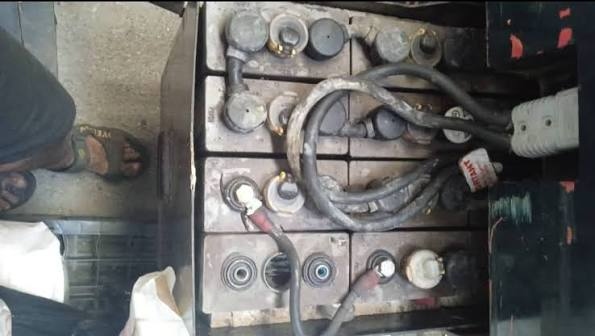
Battery problems are among the most common causes of poor reach truck performance. If the truck feels slow, loses power quickly, or shows warning messages, check whether the battery is charged and connected correctly. Damaged cables, loose connectors, corroded terminals, or aging batteries can reduce performance.
Operators should not try to repair battery problems unless trained and authorized. Report charging faults, unusual heat, odor, leaking, or damaged connectors immediately.
Hydraulic and Mast Problems
Reach trucks depend on hydraulic power for lifting, lowering, reaching, retracting, tilting, and sometimes sideshifting. If these functions become slow, noisy, uneven, or weak, the truck should be inspected. Hydraulic leaks are especially important because they can affect load control and create slip hazards.
Mast chains, rollers, rails, and reach components should be maintained regularly. Poor lubrication or worn parts can cause jerky movement and reduce accuracy when placing pallets.
Conclusion
Operating a Crown reach truck requires proper training, authorization, and careful control use. The operator must inspect the truck, enter the operator area correctly, understand the multi-task handle, control speed, steer smoothly, and operate the forks and reach mechanism with precision. Safe travel position, pedestrian awareness, tip-over prevention, and proper parking are essential parts of daily operation.
Common reach truck problems include weak travel power, slow lifting, jerky movement, steering issues, brake faults, hydraulic leaks, error codes, and reach mechanism wear. By following safe operating procedures and reporting problems early, operators can help keep Crown reach trucks productive, reliable, and safer in demanding warehouse environments.
Add a review
Your email address will not be published. Required fields are marked *