
What Causes an Electric Golf Cart to Jerk?
A jerky electric golf cart usually points to uneven power delivery—often from batteries, wiring, sensors, or a weak solenoid—especially under load.
If your electric golf cart jerks, stutters, or hesitates when you press the pedal, you’re dealing with a drivetrain that isn’t receiving steady current. Most of the time, the cart is not “randomly acting up”—it’s reacting to an intermittent electrical path, a tired battery pack, or a signal that’s jumping around. The good news is that jerky acceleration is usually fixable with systematic checks rather than guesswork.
This guide breaks down the most common causes of a jerking electric cart, what each issue feels like in real driving, and the practical steps you can take to restore smooth acceleration. The focus is on root causes that create power dropouts or inconsistent throttle input.
Why Jerking Happens: Intermittent Power Delivery
Electric carts accelerate smoothly when three things stay stable: battery voltage under load, clean/tight high-current connections, and a consistent throttle signal. Jerking typically shows up when one of these changes suddenly—like a loose cable that briefly opens the circuit, a solenoid that chatters, or a throttle sensor that sends “up-down-up-down” signals even though your foot is steady.
Top Reasons for a Jerky Electric Golf Cart
1) Battery Issues
Weak or failing batteries are one of the most common reasons an electric cart jerks on takeoff. A battery pack can look “fine” at rest, then sag hard when you demand current. That voltage drop can cause the controller to limit output, the solenoid to chatter, or the cart to surge and pause repeatedly.
- Typical symptoms: Jerks mainly on hills or when carrying passengers, reduced top speed, slower acceleration as the pack drains.
- What to check: Pack voltage under load (not just at rest), individual battery condition, and signs of swelling/leaks on older packs.
- Common mistakes: Replacing only one bad battery in an old set—mismatched batteries can create ongoing imbalance and poor performance.
2) Loose or Corroded Connections
A cart may jerk simply because power cannot flow consistently through its cables and terminals. Corrosion adds resistance; loose lugs create brief disconnects; damaged cables can open up under vibration. Under acceleration, the current demand increases, and those weak points show up as hesitation or stutter.
- Typical symptoms: Jerks when you hit bumps, intermittent cut-outs, occasional no-go moments that “fix themselves.”
- What to inspect: Battery terminals, main positive/negative leads, controller connections, and motor cables.
- Red flags: White/green buildup, heat discoloration, melted insulation, or terminals that move by hand.
3) Faulty Solenoid
The solenoid is essentially a high-current switch that connects battery power to the controller/motor circuit when you accelerate. If the solenoid coil is weak, internal contacts are burned, or voltage is unstable, it may “chatter” (rapidly turning on/off). That on/off behavior feels exactly like jerking or stuttering.
- Typical symptoms: Clicking noises during acceleration, cart surges then pauses, sometimes worse when batteries are low.
- Quick clue: Repeated clicking while holding the pedal often points to solenoid chatter or unstable voltage feeding it.
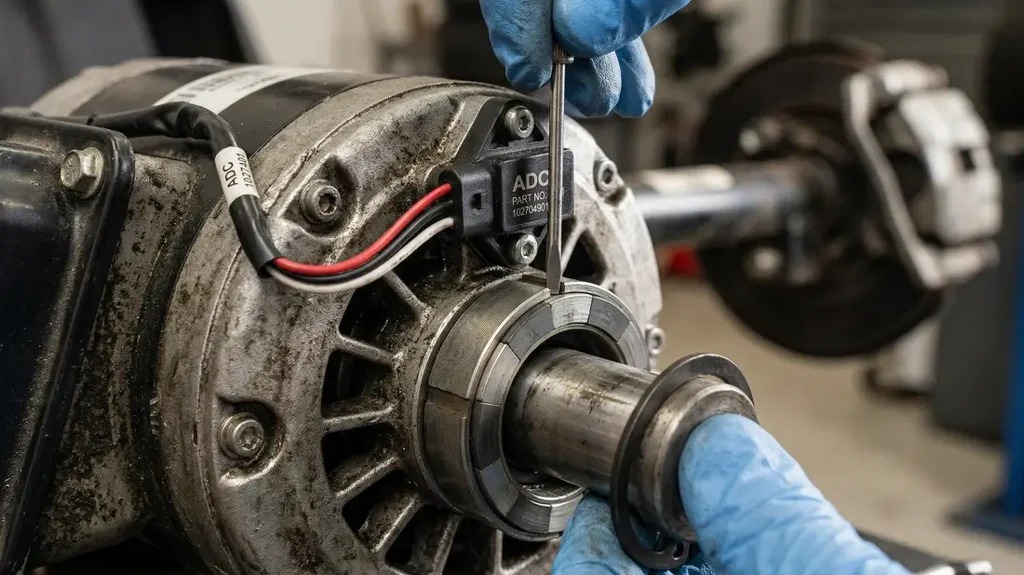
4) Speed Sensor or Throttle Sensor (MCOR)
Your cart needs a clean signal that tells it how much power you’re requesting. Many carts use a throttle sensor (often referred to as MCOR in some systems) that converts pedal movement into an electrical signal. If that sensor is worn, dirty, misaligned, or failing, it can output a jittery signal—so the controller keeps changing power even when your foot is steady.
- Typical symptoms: Jerky acceleration from a stop, “hunting” speed at low throttle, inconsistent response (too strong then too weak).
- What to check: Sensor mounting, wiring plug condition, and smoothness of pedal travel (no sticking or dead spots).
5) Worn Motor Brushes
On carts with brushed motors, worn brushes can cause uneven contact with the commutator. Under load, the motor may lose smooth electrical contact momentarily, leading to surging, hesitation, or a rough feel. This can worsen over time and is often accompanied by other signs like reduced torque.
- Typical symptoms: Rough acceleration, weaker climbing power, intermittent surging, sometimes unusual motor noise.
- What to consider: If the cart has many hours and the symptom is getting steadily worse, motor service may be due.
How Do You Fix Jerky Acceleration?
Use a simple order of operations: start with the easiest, most common issues (batteries and connections), then move to switching components and sensors.
Step 1: Start With Battery Health
- Charge fully and re-test symptoms.
- Check pack voltage under load: a big drop when you accelerate suggests weak batteries or resistance in cables.
- Look for imbalance: if one battery is significantly weaker than the rest, it can trigger performance issues.
Step 2: Tighten and Clean High-Current Connections
- Turn the key off and secure the cart before working.
- Inspect, clean, and tighten battery terminals and main cables.
- Check for heat marks (a sign of resistance) around lugs and connectors.
- Confirm cable insulation isn’t cracked or rubbed through.
Step 3: Listen for Solenoid Chatter
If you hear rapid clicking while pressing the pedal, the solenoid may be switching on and off. That can be caused by:
- Low battery voltage under load
- Weak solenoid coil
- Burned internal contacts
- Poor wiring or ground feeding the coil circuit
After confirming the batteries and connections are solid, a persistently chattering solenoid is often replaced rather than “repaired.”
Step 4: Check the Throttle/Speed Signal
If the cart jerks mostly at low speed or right off the line, suspect the throttle sensor or related wiring. Look for:
- Loose plugs or pins backing out of connectors
- Damaged sensor wiring near moving pedal parts
- A pedal that sticks, binds, or has a dead spot
When the signal is unstable, the controller can’t deliver steady power—so the cart feels like it’s “thinking” or surging.
Step 5: Consider Motor Brush Wear (If Applicable)
If you’ve confirmed batteries, cables, and sensors are good, and the cart still surges under load, the motor may need inspection. Worn brushes and commutator wear can create rough power delivery. This is typically a service job rather than a quick driveway fix, but it’s a common cause on high-hour carts.
Quick Diagnostic Clues (Match Symptoms to Likely Causes)
- Jerks mostly uphill or with passengers: battery voltage sag, weak battery pack, resistance in main cables.
- Jerks when hitting bumps: loose cable lug, worn connector, intermittent wiring fault.
- Rapid clicking during acceleration: solenoid chatter (often triggered by low voltage or a failing solenoid).
- Jerky only at low throttle: throttle sensor/speed signal inconsistency.
- Gradually worsening roughness over months: motor brush wear (on brushed systems) or general electrical aging.
Preventing Jerky Acceleration in the Future
Once your cart is running smoothly again, a few habits can reduce repeat issues:
- Keep batteries healthy: charge properly and avoid storing fully discharged.
- Inspect terminals regularly: clean corrosion early and keep connections tight.
- Protect wiring: prevent rubbing points and secure cables away from moving parts.
- Address small symptoms fast: mild hesitation today can become major surging later.
Conclusion
An electric golf cart that jerks, stutters, or hesitates usually has one underlying theme: power or signal inconsistency. In many cases, the fix starts with battery strength and clean/tight connections, then moves to the solenoid and throttle/speed sensing components. Work through the checks step by step, and you’ll usually find a clear culprit—then get back to smooth, predictable acceleration.


Add a review
Your email address will not be published. Required fields are marked *