
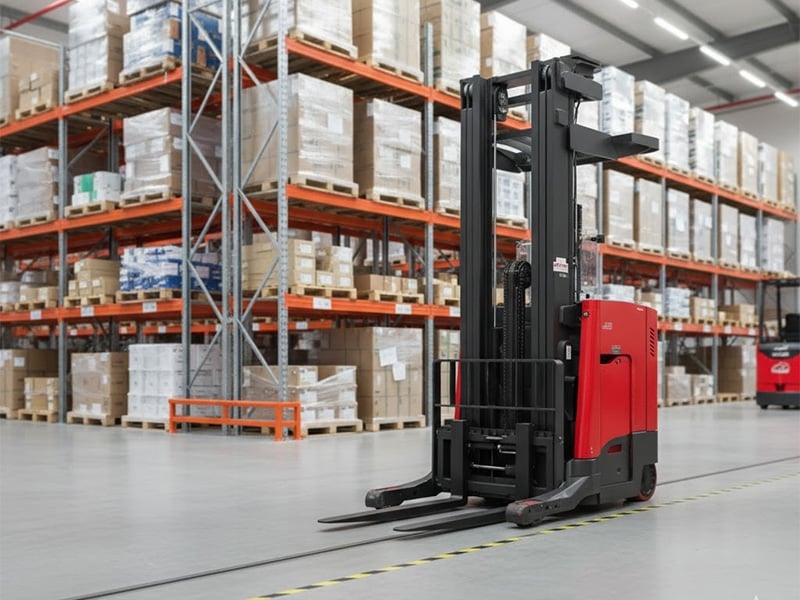
How to Adjust Speed on a Raymond Reach Truck: Programming, Safety, and Troubleshooting Guide
Adjusting Raymond reach truck speed should be done only by authorized personnel using programming mode and proper safety procedures.
Raymond reach trucks are widely used in warehouses, distribution centers, and high-density storage environments because they are designed for narrow aisles, high lifting, and precise pallet handling. One common question from operators and maintenance teams is how to adjust speed on a Raymond reach truck. In most cases, travel speed and performance settings are controlled through the truck’s electronic programming system rather than a simple mechanical adjustment.
On many Raymond reach truck models, such as certain 750-R35TT, 8210, and similar series trucks, speed adjustment may involve entering a service or programming mode through the Etac display or controller interface. A common process involves powering the truck on while holding a control input, entering an authorized access code, navigating to a program menu, and changing specific parameters. However, because speed settings directly affect braking distance, stability, load control, operator safety, and workplace compliance, these adjustments should only be performed by trained and authorized technicians.
This guide explains the general process, key safety concerns, common reach truck problems, and why speed adjustments should never be treated as casual operator changes. Always follow the Raymond service manual, your company’s maintenance policy, and local workplace safety rules before changing any performance parameter.
Why Raymond Reach Truck Speed Settings Matter
Reach truck speed affects more than how quickly the machine travels through an aisle. It influences stopping distance, turning behavior, load stability, operator reaction time, and the risk of collisions. In narrow aisles, even a small increase in travel speed can create a higher chance of striking racks, pallets, pedestrians, dock equipment, or other vehicles.
Speed settings also affect productivity. A truck that is set too slowly may reduce workflow efficiency, especially in large warehouses. A truck that is set too aggressively may increase damage, tire wear, operator fatigue, and accident risk. The goal is not simply to make the truck faster. The goal is to set the truck appropriately for the facility, operator skill level, aisle width, floor condition, traffic pattern, load weight, and company safety policy.
General Steps to Adjust Speed on a Raymond Reach Truck
| Step | General Description |
|---|---|
| Enter Program Mode | Many models require entering a programming or service mode through the display or controller interface, often using a specific key-on sequence. |
| Enter Password | Access is usually protected and should be limited to authorized technicians or trained maintenance personnel. |
| Navigate to Parameters | The technician locates the correct program menu or parameter group related to travel speed, acceleration, braking, or performance mode. |
| Adjust Settings | Speed-related values are changed according to the service manual, site safety requirements, and approved operating limits. |
| Save and Exit | Settings are saved properly, the truck is restarted if required, and performance is tested in a controlled area before returning to service. |
Step 1: Enter Program Mode
On some Raymond reach trucks, programming mode may be accessed through the Etac display or similar onboard interface. The exact entry method depends on the model, controller version, and software configuration. Some trucks require a key-on sequence using a control button, while others may require service software or dealer-level access.
Because different Raymond models can use different control systems, operators should not rely on random instructions from online forums or unrelated models. A 750 series truck may not use the same programming structure as another Raymond model. The correct service manual is the safest and most accurate reference.
Step 2: Enter Authorized Access
Programming access is normally restricted because incorrect changes can create unsafe operating conditions. A password or authorized access procedure may be required. This should be handled by a qualified technician, fleet manager, or approved service provider.
It is not recommended for regular operators to experiment with access codes or change hidden parameters. Speed, braking, acceleration, lift limits, and steering response can all affect workplace safety. Unauthorized changes may also violate company policy, equipment warranty terms, or safety regulations.
Step 3: Navigate to the Correct Parameters
Once inside the programming menu, the technician must locate the correct parameter group. Depending on the truck, speed control may be separated into different settings such as maximum travel speed, acceleration rate, deceleration rate, braking response, creep speed, lift speed, travel speed with forks raised, or performance profile.
This is where caution is especially important. Adjusting the wrong parameter can create unexpected truck behavior. For example, changing acceleration without adjusting braking may make the truck feel unstable. Increasing speed without considering load height can increase risk during turns or aisle travel. Any adjustment should be documented and based on approved values.
Step 4: Adjust Settings Safely
Speed settings should be changed gradually and within approved limits. A facility may choose different settings for beginner operators, congested aisles, heavy loads, or high-traffic zones. Some operations may use reduced travel speeds inside narrow aisles and slightly higher speeds in open warehouse areas, depending on the truck’s capabilities and site policy.
When adjusting speed, consider the following factors:
- Aisle width and rack clearance
- Floor condition and surface levelness
- Pedestrian traffic
- Load weight and load height
- Operator experience level
- Battery condition and truck performance
- Company safety rules and insurance requirements
The best setting is not always the highest setting. In many warehouses, a controlled and predictable speed improves safety and productivity more than maximum speed.
Step 5: Save, Exit, and Test
After changes are made, the technician should save the settings according to the correct procedure. The truck may need to be powered off and restarted. Before returning it to normal use, testing should be performed in a safe, open, controlled area away from pedestrians, racks, and stored goods.
The test should include forward travel, reverse travel, acceleration, stopping, turning, low-speed control, and operation with forks in safe positions. If the truck feels unstable, jerky, delayed, or unpredictable, it should be removed from service and rechecked. Documentation should include the old setting, new setting, reason for the change, technician name, and test result.
Important Safety Warning
Never adjust a Raymond reach truck’s speed simply to increase productivity without a safety review. Reach trucks are designed for precision handling in narrow aisles, and speed changes can alter the way the machine responds. A faster truck may require longer stopping distance, more operator skill, and more aisle clearance.
Only authorized personnel should make programming changes. Operators should report performance concerns, but they should not attempt to bypass programming controls or modify settings on their own. If speed seems too slow, too fast, inconsistent, or unsafe, the correct response is to notify a supervisor or maintenance technician.
How Speed Settings Affect Warehouse Safety
Warehouse environments are dynamic. Pedestrians may cross aisles, pallets may be staged near travel lanes, and other equipment may operate nearby. A reach truck with poorly adjusted speed settings can increase the risk of rack impacts, load shifts, product damage, and operator injury.
Speed should also match visibility. Narrow aisles, blind corners, dock areas, and busy intersections may require slower operation. Even if a truck can travel faster, the work environment may not support higher speeds safely.
Good fleet management often includes speed control policies. These may vary by area of the warehouse. For example, a company may allow higher speed in open travel lanes but require lower speed near docks, pedestrians, intersections, and rack aisles.
What Are the Common Problems with Reach Trucks?
Reach trucks are reliable machines when properly maintained, but they can develop problems due to heavy use, poor charging habits, rough floors, operator error, or delayed maintenance. Understanding common issues helps operators report problems early and avoid larger failures.
| Common Problem | Possible Cause |
|---|---|
| Slow or Weak Travel | Low battery charge, worn battery, controller issue, drive motor problem, or speed setting restriction. |
| Poor Lifting Performance | Hydraulic fluid issue, pump wear, leaking cylinder, clogged filter, or overloaded truck. |
| Jerky Movement | Controller calibration issue, worn drive components, poor battery connection, or damaged sensors. |
| Steering Problems | Worn steering components, sensor faults, low voltage, or electronic steering system issues. |
| Brake Issues | Worn brakes, incorrect adjustment, electrical fault, or regenerative braking problem. |
| Error Codes on Display | Sensor faults, communication errors, controller issues, battery problems, or system protection events. |
| Battery Drains Quickly | Old battery, poor charging routine, damaged cells, high-demand operation, or charger mismatch. |
| Mast or Reach Mechanism Issues | Hydraulic leaks, worn rollers, damaged chains, poor lubrication, or misalignment. |
Battery and Charging Problems
Many reach truck performance complaints are related to battery condition. A weak battery can make the truck feel slow, reduce lifting power, trigger error codes, or cause shutdowns. Before changing speed parameters, technicians should confirm that the battery is healthy and fully charged.
Loose battery connectors, corroded terminals, low electrolyte levels in lead-acid batteries, charger problems, or aging cells can all affect performance. If the truck is slow only near the end of a shift, the issue may be battery capacity rather than programming.
Hydraulic System Problems
Reach trucks rely on hydraulic systems for lifting and reach functions. If the truck lifts slowly, lowers unevenly, leaks fluid, or makes unusual pump noise, the hydraulic system should be inspected. Low fluid, contaminated fluid, worn seals, damaged hoses, or pump wear can reduce performance.
Operators should report hydraulic leaks immediately. A small leak can become a major safety issue, especially when lifting heavy pallets at height.
Controller and Sensor Issues
Modern Raymond reach trucks depend on electronic controllers and sensors. These systems manage travel speed, braking, steering, lift functions, and safety interlocks. If a sensor is damaged or out of calibration, the truck may operate in a restricted mode or display error codes.
Before adjusting speed settings, technicians should check for active fault codes. A speed complaint may be caused by a fault condition, not by a low speed parameter. Changing programming without diagnosing the root cause can hide the real problem and create unsafe operation.
When to Call a Technician
A trained technician should be called if the truck displays error codes, loses power suddenly, lifts slowly, brakes inconsistently, steers poorly, or behaves unpredictably after programming changes. Speed adjustment should not be used as a quick fix for mechanical or electrical problems.
Professional service is especially important when working with controller parameters, hydraulic systems, braking systems, mast components, or battery faults. These systems directly affect operator safety and load control.
Best Practices After Adjusting Speed
After any speed adjustment, update maintenance records and inform operators of the change. A truck that responds differently can surprise regular drivers if they are not told. Operators should be given time to test the truck safely and understand the new behavior.
Supervisors should monitor performance after the change. If damage incidents, near misses, or operator complaints increase, the setting may need to be reviewed. Speed settings should support both productivity and safety, not one at the expense of the other.
Conclusion
Adjusting speed on a Raymond reach truck usually requires entering a protected programming mode through the onboard display or service interface, accessing authorized parameters, changing approved speed-related settings, saving the configuration, and testing the truck in a controlled area. The exact process depends on the model, software, and service requirements.
Because reach truck speed affects safety, stability, braking, and load handling, adjustments should only be made by authorized and trained personnel. Before changing settings, check for battery problems, hydraulic issues, controller faults, and mechanical wear. A properly adjusted reach truck can improve productivity, but only when the settings are matched to the operator, warehouse layout, and safety requirements.



Add a review
Your email address will not be published. Required fields are marked *