
How to Adjust Speed on a Toyota Forklift – Complete 2026 Guide
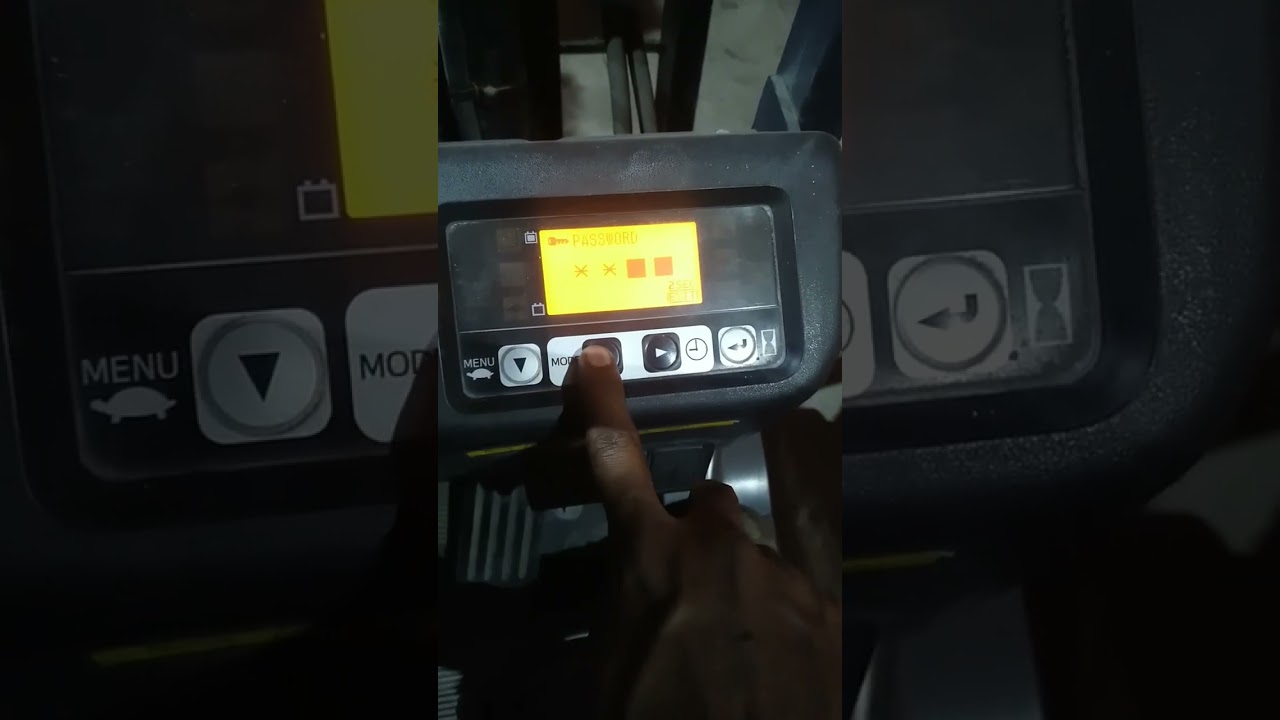
Changing the speed on a Toyota forklift typically involves accessing the onboard display menu (hidden menu) or using specialized service software. The operator can often adjust performance settings like maximum travel speed, acceleration, and hydraulic responsiveness through the display console using the yellow menu button, arrows, and key pad to select options like “power mode” or “speed limit”.
Why Adjust Forklift Speed?
Speed adjustment is a common requirement for safety, productivity, and regulatory compliance. In busy warehouses, operators may need to reduce maximum travel speed to prevent accidents in tight aisles. On construction sites or outdoor yards, higher speeds may be preferred for efficiency. Many facilities also set lower speeds for new operators or in areas with pedestrians. Toyota forklifts allow these changes through the built-in display menu on most modern models, giving fleet managers precise control over performance without external hardware in many cases.
Key Steps to Change Speed on a Toyota Forklift
1. Accessing the Hidden Menu
Most Toyota forklifts (8-series and later) use a hidden service menu accessed directly from the operator display. With the key on but the forklift not moving, press and hold the yellow menu button (often labeled “MENU” or with a gear icon) for 5–10 seconds until the display shows “Service Mode” or “Parameter Settings.” Some models require a specific key sequence: press MENU + UP arrow simultaneously while turning the key on. Always refer to your model’s operator manual for the exact sequence, as slight variations exist between gas, LPG, diesel, and electric models.
2. USA Model Access
USA-market Toyota forklifts may have additional security steps due to safety regulations. After entering the menu, you may need to enter a dealer-level password (commonly 00000 or a model-specific code) or use a service tool. Once inside, navigate to “Travel Speed,” “Acceleration,” or “Power Mode” using the arrow keys. Select the desired setting and confirm with the Enter button.
3. Performance Settings
Inside the menu you can adjust several parameters:
- Maximum Travel Speed: Typically adjustable from 5 mph to 12+ mph depending on model.
- Acceleration Ramp: Controls how quickly the forklift reaches top speed (smoother for safety, faster for productivity).
- Hydraulic Speed: Adjusts lift and tilt speed for safer load handling.
- Power Mode: Switches between Economy, Normal, and High Performance modes.
After making changes, exit the menu and test the forklift in a safe, open area before returning to normal operation.
4. External Speed Limiter
Some facilities install external speed limiters (electronic or mechanical) for added safety. These devices are wired into the controller and override the internal settings. If your forklift has an aftermarket limiter, adjustments must be made through the device’s own interface rather than the Toyota menu.
How Fast Can a Toyota Forklift Go?
Standard Toyota forklifts have a maximum travel speed of 8–12 mph when unloaded, depending on model and power source. Loaded speeds are usually 1–3 mph slower. High-capacity and outdoor-rated models can reach 15+ mph. Electric forklifts are often governed to slightly lower speeds for safety and battery efficiency, while internal combustion models can achieve higher top speeds. Always respect the posted speed limits in your facility and never exceed the manufacturer’s rated speed for your specific model.
Safety and Best Practices
Speed adjustments should only be performed by trained technicians or authorized personnel. Incorrect settings can reduce stability, increase stopping distance, or cause unintended acceleration. After any change, perform a full operational test in a controlled area. Document all modifications for compliance and maintenance records. For operations seeking lower maintenance and smoother speed control, modern electric forklifts provide excellent adjustability through digital interfaces and often include factory speed-limiting features.
Conclusion
Adjusting the speed on a Toyota forklift is straightforward once you know how to access the hidden menu. Most operators can change maximum travel speed, acceleration, and performance modes directly from the display console using the yellow menu button and arrow keys. Always verify the correct procedure for your specific model and year, and document any changes. For businesses looking to modernize their fleet with smoother operation, reduced maintenance, and precise digital speed control, upgrading to advanced electric models is a smart long-term investment.

Add a review
Your email address will not be published. Required fields are marked *